Free Minecraft hosting — what actually works in 2026
Honest guide to the best free Minecraft server hosts: Aternos, Minehut, Server.pro, Oracle Cloud Always Free, and home DIY. Queues, sleep, RAM, ads, Bedrock notes—and when free stops being free enough.
Free listing · Not a host
Got a server IP? List it on Minelist
Minelist is a Minecraft server list, not a hosting company. Host free or paid elsewhere—then add your server so players can find your IP, vote, and check status.
Free Minecraft hosting is real—and it has trade-offs
If you searched free Minecraft hosting, best free Minecraft server hosts 2026, free Aternos alternative, or host a Minecraft server for free, you already know the pitch: zero monthly invoice, world online tonight, friends join before dinner. Sometimes that works. Often “free” means waiting in a queue, waking a sleeping server, watching ads, or babysitting a Linux VPS that Oracle (or your ISP) can still take away.
This guide is written for server owners—not for people selling hosting. Minelist does not host Minecraft worlds. We run a discovery directory so players can find Java, Bedrock, and crossplay servers. That means we care whether your IP is reachable, whether your listing is honest, and whether free-tier sleep timers sabotage the players you just invited from our homepage. We are not ranking hosts because someone paid us; if that ever changes we disclose it under our editorial policy. Free-tier limits change constantly—verify RAM, slots, queues, and regions on each provider’s site before you plan a public launch.
Disclaimer: Minecraft® is a trademark of Mojang Synergies AB / Microsoft. Minelist is not affiliated with Mojang or Microsoft. Provider names (Aternos, Minehut, Server.pro, Oracle, etc.) are used for identification. Specs quoted here are illustrative of how free tiers typically behave—always confirm current limits on the provider’s official website. External links use rel="noopener noreferrer"; we do not invent affiliate URLs in this guide.
New to servers entirely? Pair this page with how to make a Minecraft server, how to join a Minecraft server, and—if you want Fabric/Forge—our modded server guide. After the world runs, use our server status checker and the growth playbook so free hosting is not wasted on an empty spawn.
What free Minecraft hosting really means
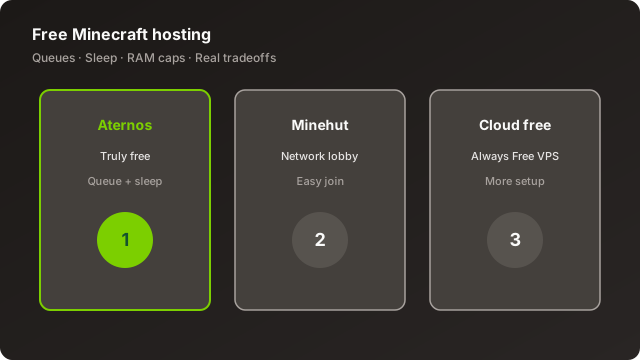
“Free Minecraft server hosting” usually falls into one of four buckets. Confusing them is how people lose worlds and temper.
1) Forever-free managed game hosts
Services like Aternos and parts of Minehut / Server.pro give you a panel, a jar (vanilla, Paper, sometimes mod loaders), and a shared IP or subdomain. You do not SSH into a box. In exchange, the provider ration resources: RAM caps, CPU shares, concurrent online limits, storage quotas, and often queues when too many people try to start servers at once. Many shut the process down when the last player leaves (sleep) so idle worlds do not burn electricity. Restarting can take one to several minutes—long enough that a stranger from a server list already left.
2) Free-tier cloud VPS (DIY)
Oracle Cloud Always Free (and similar cloud free tiers when available) gives you a virtual machine: CPU, RAM, disk, public IP. You install Java, open firewall ports, run systemd or a screen session, and own every crash. Performance can beat managed free hosts because you are not waiting behind a global start queue—but capacity is not infinite, shapes change, and accounts can hit soft limits. This is free of hosting-panel fees, not free of learning Linux.
3) Home / PC hosting
Running the official server jar (or Paper) on a desktop or laptop you already own. No monthly game-host bill. You still pay power, risk thermal throttling, and usually expose a home IP unless you use a tunnel. Port forwarding TCP 25565 (Java) or UDP 19132 (Bedrock) is the classic gotcha—especially behind CGNAT.
4) Time-boxed free trials
Paid hosts sometimes offer 24–72 hour trials or credit. Great for benchmarking TPS with your plugin list. Terrible as a permanent home: when the trial ends, so does the public address unless you pay.
Queues
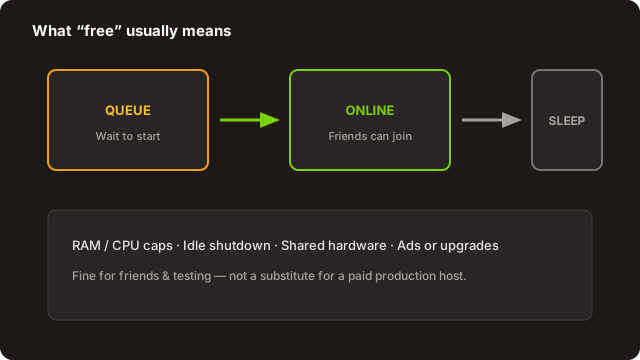
A start queue means your world is not yours to wake on demand during peak hours. Friend groups learn to schedule play sessions. Public servers listed on Minelist suffer more: a player copies your IP, gets connection refused or a “starting…” stall, and never returns. If your growth plan depends on random list traffic, queues are a first-class product problem—not a minor inconvenience.
Sleep / auto-stop
Sleep saves the provider money. It also means Discord “anyone online?” messages turn into five-minute waits. Staff who need to build while the server is empty may still need to keep a dummy account online or pay for always-on. Document the wake process for your community so people do not assume the IP is dead.
RAM, CPU, and “slots”
Advertised player slots and usable RAM are different things. A free plan might allow 10–20 slots on paper while stuttering at six with a modest Paper plugin stack. Chunk generation, redstone farms, and entity-heavy shops eat the same budget whether the invoice is $0 or $12. Measure TPS and MSPT under your real peak—not under one AFK alt.
Ads, credits, and soft paywalls
Some free hosts show ads in the panel, sell priority queue skips, or offer credits for cosmetics and boosts. That is a legitimate business model. Just budget honesty into your plan: if “free” only works after friends buy skips every evening, you already have a paid host with extra friction.
Rule of thumb: Use forever-free managed hosting for whitelisted friend SMPs, prototypes, and learning panels. Use free-tier VPS if you enjoy ops. Use home hosting for LAN-first or tiny trusted groups. Use paid hosting when strangers from a minecraft server list are part of the plan.
How free hosting changes player psychology
Players do not read your hosting invoice. They read latency, join success, and whether the world exists when Discord says “hop on.” A free host that takes four minutes to wake teaches newcomers that your IP is unreliable—even if your builds are gorgeous. Returning friends will tolerate the ritual; cold traffic from search will not. That asymmetry is why the same Aternos world can feel “fine” to a five-person SMP and “dead” as a public listing.
Write your community rules around the real product: scheduled play nights, a pinned “how to start the server” message, and honesty in any public description. If you later move to paid always-on hosting, those habits still help—you simply remove the wake step instead of rebuilding culture from scratch.
Bandwidth, regions, and ping
Free managed hosts place you in their regions, not yours. A European friend group on a US-heavy free fleet will feel rubber-banding that no plugin fixes. Oracle and home hosting let you pick geography more deliberately (home = your ISP’s path; Oracle = whichever Always Free region still has capacity). Before you invest weeks of building, have two players in different networks run /tps equivalents and plain movement tests. Ping on a server list card matters only if the host can sustain that path under load.
Comparison overview — free Minecraft hosts at a glance
This table is a planning snapshot, not a live SLA. Columns describe typical behavior of free tiers as owners experience them in 2026. Confirm every cell on the provider’s site before you migrate a season world.
| Option | Type | Always online? | Skill needed | Best for | Watch-outs |
|---|---|---|---|---|---|
| Aternos | Managed free | No (queue + sleep) | Beginner | Friends SMP, learning Paper | Wait times at peak; public list traffic |
| Minehut | Managed free + ecosystem | Plan-dependent | Beginner | Lobby play, simple servers | Credits / limits; brand IP style |
| Server.pro free | Managed free tier | Often limited | Beginner | Trying their panel before paid | Free vs paid feature gap |
| Oracle Always Free | Cloud VPS DIY | Yes (if you keep it up) | Intermediate+ | Always-on vanilla/Paper small | Linux, firewall, free-tier shapes |
| Home PC / laptop | Self-host | While PC is on | Beginner–intermediate | LAN, trusted friends | Power, IP exposure, CGNAT |
| Paid trial | Timed paid host | During trial only | Beginner | Benchmarking plugins | World dies when clock hits zero |
Next we go deep on each major option—with pros, cons, and who should actually pick it.
Aternos — deep dive
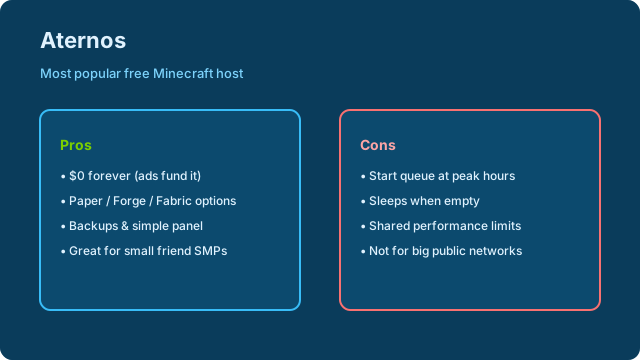
Aternos is the name most players associate with free Minecraft hosting. The panel is approachable: create an account, pick software, start when a slot opens, share the address. For thousands of small groups it is good enough. For a competitive public Survival network aiming for daily votes on Minelist, the same design becomes the bottleneck.
How it typically feels day to day
Someone in Discord asks to play. An operator opens the Aternos site, hits start, and—depending on time of day—either boots quickly or sits in a queue. Once online, friends join. When everyone logs off, the server sleeps. Next session repeats. Software choices often include vanilla and popular plugin platforms; modded options exist with the usual RAM reality check. Backups and file managers are available in-panel—use them, and still download critical worlds occasionally to your own drive.
Pros
- True $0 forever-free model for many use cases—no credit card required to experiment.
- Low learning curve compared with Oracle or bare metal; great first host after reading how to make a server.
- Software variety for vanilla, plugins, and some mod setups without SSH.
- Community familiarity — friends already know how to wait for start; less support burden explaining Linux.
- Enough for whitelists — four to ten trusted players with light plugins can have real seasons.
Cons
- Queues at peak — evenings and weekends are contested; your “open now” marketing lies.
- Sleep when empty — strangers from lists bounce; AFK bots are a fragile workaround and may violate rules.
- Shared performance — noisy neighbors and CPU limits show up as rubber-banding under farms.
- Not ideal for staff workflows — builders who need the world empty still pay the start tax.
- Public growth friction — combining Aternos sleep with Minelist discovery often wastes clicks.
Who Aternos is for
Friend SMPs, classroom demos, plugin learning, and “we’ll see if this gamemode is fun” prototypes. Who it is not for: networks promising 24/7 uptime in their MOTD, heavy modpacks, or any server whose main acquisition channel is cold traffic from a directory.
Operator tip: Put the wake instructions in Discord (who starts, what to do if queued, expected wait). Misaligned expectations create more drama than low TPS.
Practical Aternos operating habits
Treat the panel like shared infrastructure. Nominate two people who know the account recovery email. Export the world before any major plugin experiment. Keep a text file of your exact software type and version so a rebuild after a bad update takes minutes instead of an evening of forum archaeology. If you use datapacks, store the zip outside the panel—free file managers are easy to mis-click.
For plugins: install the minimum that protects the world (claims or grief logging) before economy suites. Free RAM disappears into listeners you forgot you added. After each plugin add, run around spawn with two clients and watch for hitching. If you need a custom resource pack, host the pack on a reliable HTTPS URL; do not assume players will dig through Discord pins while the server is still starting.
Aternos and public discovery
You can list an Aternos IP on Minelist. You should only do it if the listing text sets expectations (“friends SMP—message Discord to start”) or if someone reliably keeps the server awake during advertised hours. A banner that screams 24/7 while the process sleeps is how you collect frustrated comments and wasted votes. Pair any listing with the status checker so you notice outages before players do.
Minehut — deep dive
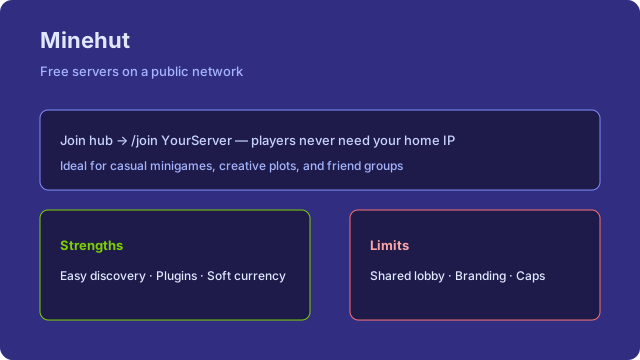
Minehut sits in a slightly different niche: a hosting brand with a large lobby ecosystem, free server creation for many users, and monetization through credits, cosmetics, and upgrades. Players often discover Minehut as a destination network first, then spin up their own server inside that universe. That social gravity is a feature—and a constraint if you wanted a totally independent brand IP on every YouTube thumbnail.
Pros
- Beginner-friendly creation flow — get a world running without port forwarding.
- Built-in discovery inside Minehut — useful if your audience already hangs out there.
- Plugins / gamemode templates — faster to prototype minigames than a blank VPS.
- Upgrade path on the same brand — if free limits bite, you may stay in-ecosystem rather than migrate files.
- Community tools — depending on current features: external domains, backups, and collaborator access (verify live docs).
Cons
- Free-plan ceilings — RAM, player counts, or always-on behavior may push you toward credits/paid.
- Brand association — your “IP” may feel like a Minehut sub-server rather than an independent network.
- Policy & moderation surface — you operate under their ToS; appeals go through their process.
- Performance variance — shared infrastructure still means spikes during popular events.
- Migration later — leaving any managed ecosystem means exporting worlds, rewiring plugins, and re-educating players on a new address.
Who Minehut is for
Creators who want free hosting plus an existing player funnel inside Minehut, teachers running short-lived worlds, and owners testing gamemodes before paying for dedicated hardware. If your identity is “join play.yourbrand.net” with custom proxy architecture, expect to outgrow free Minehut or use it only as a staging ground.
Working with Minehut’s limits without rage-quitting
Start by reading the live free-plan sheet for RAM, player caps, and whether idle servers hibernate. Build your gamemode to those numbers: fewer simultaneous worlds, lighter lobbies, and clear AFK policies. If credits or paid boosts are part of your plan, treat them as a budget line—not a surprise Discord tax on friends. Export worlds on a schedule even if the panel offers backups; brand migrations happen when communities grow or policies change.
Branding tip: if you eventually leave Minehut for a VPS, prepare a redirect week—same Discord announcement style as any IP migration. Update Minelist the hour the new address is live. Players forgive one clean move; they do not forgive three conflicting IPs across YouTube, TikTok, and an old forum thread.
Server.pro free plan — deep dive
Server.pro is widely known as a paid Minecraft host that has also offered free or freemium entry points historically. Treat the free plan as a constrained slice of their panel—useful for evaluation—not as a promise of unlimited production capacity. Exact free-tier specs (RAM, slots, hibernation, regions) change; open their pricing/free page before you commit a season.
Pros
- Familiar game-hosting panel — file manager, jar selector, console—skills transfer if you upgrade.
- Try-before-you-buy realism — feel their support docs and UI before paying.
- Plugin-friendly workflows — similar to other managed hosts for Paper/Spigot stacks.
- Clearer upsell path — when free hurts, the paid SKU is obvious (unlike jumping from Aternos to random VPS).
- Region options on paid — planning future ping for your Minelist country targeting is easier if you stay with one vendor.
Cons
- Free may hibernate or throttle — same class of problems as other free managed hosts.
- Feature gaps — databases, extra ports, custom domains, or backups might sit behind paid.
- Not “Oracle free forever compute” — you are on a game host’s economics, not a cloud Always Free VM.
- Marketing confusion — “free Minecraft server” landing pages sometimes blur trial vs forever-free; read the fine print.
- Public traffic readiness — if the free plan sleeps, do not advertise 24/7 on your listing.
Who Server.pro free is for
Owners comparing panels, small groups okay with limits, and people who already suspect they will pay the same brand within a month. If you need months of free always-on with root access, look at Oracle DIY or home hosting instead—and verify current Server.pro free eligibility rather than assuming a blog post from years ago is still accurate.
Evaluating the free plan like a grown-up
Spin up the free tier with your actual plugin list—not a blank vanilla jar. Generate a few hundred chunks, paste a medium schematic if that is your workflow, and invite three friends to fight and farm at once. Note startup time, console lag spikes, and whether backups restore cleanly. That one-hour test tells you more than ten affiliate landing pages. If the free plan only exists as a teaser that cannot run your stack, thank it for the panel tour and price the paid SKU honestly against Oracle DIY time cost.
Oracle Cloud Always Free / free-tier VPS — deep dive
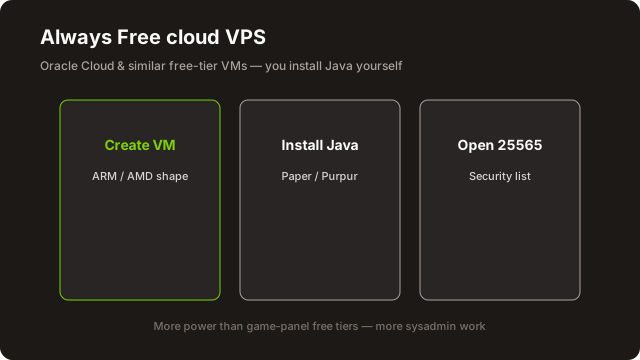
Oracle Cloud Free Tier (Always Free resources) is the power-user answer to “best free Minecraft server host.” You are not clicking Start on a game panel—you are renting a small Linux machine at $0 within Oracle’s published Always Free limits. Done well, your Paper server can stay online for list traffic. Done poorly, you leave SSH open to the world and lose the box to bots overnight.
Pros
- Always-on potential — no Aternos-style sleep if you keep the process running and the VM healthy.
- Root control — choose Paper builds, Velocity/Bungee later, Geyser, databases, Prometheus—your stack.
- Better suited to public listings — when the VM is up, strangers can connect without a wake ritual.
- Learning transferable ops skills — same habits you need on any paid VPS later.
- Cost — within Always Free shapes/limits, no monthly game-host invoice (watch egress and paid add-ons).
Cons
- Steeper skill floor — Linux users, firewalls, fail2ban/ssh keys, Java versions, systemd units.
- Free-tier shape & region roulette — ARM vs x86 availability, capacity errors, and account verification hurdles are common complaints; plans change.
- You own security — exposed 25565 without rate limits invites scanners; exposed 22 with password auth invites ransomware.
- No Minecraft-specific support desk — Oracle supports the cloud account, not your Spigot yaml.
- Backups are DIY — snapshots help if configured; still export worlds off-site.
High-level setup steps (illustrative)
- Create an Oracle Cloud account and confirm Always Free eligibility in your home region. Read the current Free Tier documentation—do not rely on screenshots from old tutorials.
- Provision an Always Free compute instance (shape/image as available). Prefer SSH key auth. Note the public IP.
- Open ingress in Virtual Cloud Network security lists / NSGs: TCP 22 (your IP only if possible), TCP 25565 for Java, UDP 19132 if Bedrock/Geyser needs it. Deny the rest.
- On the VM: update packages, create a non-root user, install a Temurin/OpenJDK version matching your Minecraft release.
- Download Paper (or official server), accept EULA, set
server-port, allocate RAM appropriate to the free shape (do not over-allocate into swap thrash). - Run under systemd or a process supervisor so the server restarts on reboot. Test locally with
ss/curlthen from a friend outside your network. - Verify publicly with the Minelist server status checker. Only then share the IP on Discord or Minelist.
- Schedule compressed world backups to object storage or an off-box destination. Document restore once before you need it.
Who Oracle Always Free is for
Comfortable DIY owners who want always-on free compute and will actually patch the OS. Not for someone who wants a one-click “create Skyblock” button tonight. If capacity is unavailable in your region, have a paid VPS fallback—do not promise your community an IP you cannot provision.
Performance expectations on small free shapes
A modest Always Free VM can run vanilla or a lean Paper server for a handful of players with good MSPT if you respect the hardware. It will not silently absorb a Create + Farmer’s Delight + exploratory chunk-loading lifestyle with twenty plugins. Set view-distance thoughtfully, use a spark profiler early, and prefer pregeneration only for areas you truly need. Swap thrashing feels like “Minecraft is broken” when it is really “we allocated more heap than RAM.”
Operational discipline that keeps free VPS alive
Enable automatic security updates or a monthly patch calendar. Watch disk fill from logs and crash reports. Rotate logs. Keep a second copy of the world outside the VM. Document the exact systemctl unit name so a future you can restart after a kernel update without rediscovering Native Minecraft folklore. If Oracle emails you about account verification or payment methods on file, handle it—the Minecraft process cannot outrun a suspended cloud account.
Self-hosting at home as “free”
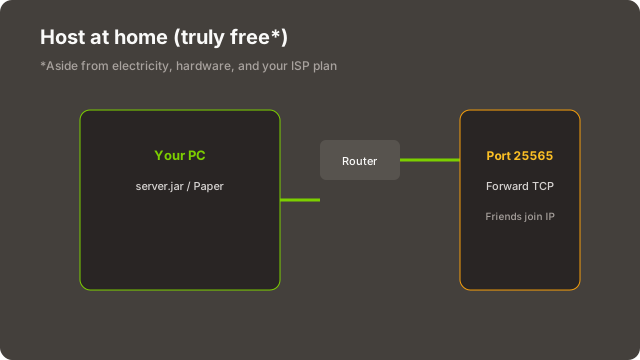
Home hosting is the oldest free Minecraft hosting method: install Java, run the jar, forward the port, text friends your public IP. It is honest about cost—you already bought the PC—and dishonest about risk if you treat a home connection like a datacenter.
Pros
- No monthly host invoice — ideal for LAN parties and tiny whitelists.
- Full control — hardware you can touch; mods as large as your RAM allows.
- Low latency for household players — local network joins are snappy.
- Great learning lab — same skills as the official “how to host on PC” path.
- Offline-capable for LAN — play continues if the WAN drops (local IPs).
Cons
- Electricity & hardware wear — 24/7 desktop is not $0.
- Dynamic IPs & CGNAT — friends lose the address; some ISPs block inbound ports.
- DDoS & doxxing risk — publishing a home IP on a public list is a security decision.
- Upload bandwidth — consumer plans choke when strangers explore generated chunks.
- Sleeping PCs — laptops that suspend kill the server; lid policies matter.
Practical home-host checklist
Use Ethernet, disable sleep while hosting, set a static LAN IP for the host machine, forward only needed ports, prefer whitelist + strong ops, and consider a tunnel service if CGNAT blocks you—understanding that tunnels add latency and another ToS. For public discovery on Minelist, many owners eventually move the same world files to a VPS so their home IP stays private.
When home hosting is the smart free choice
Choose home when the player set is tiny, trusted, and geographically close; when you are iterating on datapacks locally; or when you are learning the official server jar before paying anyone. Skip home-as-public-host when you expect strangers, stream your IP on TikTok, or your ISP forbids servers. A tunnel can mask the residential IP for a whitelist SMP, but read the tunnel provider’s limits and expect extra failure modes. For the mechanical steps of jar install and ports, stay aligned with how to make a Minecraft server.
Free trials vs forever-free — and shady “unlimited RAM” sites
Free trials
Trials from reputable paid hosts are excellent for load-testing your exact plugin jar set. Export the world when the trial ends or pay. Do not recruit fifty Discord members onto a 48-hour node unless you have budget ready. Trials are evaluation tools, not a hosting strategy.
Forever-free managed
Aternos-class hosts trade performance for permanence. Your risk is queues and sleep, not an invoice surprise—unless you buy priority. Plan community culture around those limits.
Cloud Always Free
Oracle-style free tiers can end if you break ToS, leave billing misconfigured, or rely on a shape that later exits Always Free. Read cancellation and upgrade emails. Keep backups off that single account.
Red flags on “unlimited free Minecraft hosting”
- Promises of unlimited RAM or unlimited players with zero ads and zero catch.
- Panels that demand strange browser extensions, Discord “verification” bots that steal tokens, or cracked-account markets.
- No company identity, no docs, only Telegram admins.
- Reviews that are all identical five-star spam from the same week.
- Requirement to download random
.exe“starters” instead of using a browser panel or SSH you control.
Data loss on a shady host is common. Malware via fake mods “required by the host” is worse. Stick to known brands or infrastructure you administer, and keep offline backups.
Bedrock & Geyser notes on free hosts
Java free hosts dominate the conversation. Bedrock players (Windows, consoles, mobile) need either a native Bedrock server, a host that offers Bedrock software, or Geyser (often with Floodgate) bridging Bedrock clients onto a Java backend. Each path stresses free tiers differently.
Native Bedrock on free hosting
Confirm the host supports Bedrock Dedicated Server builds and exposes UDP 19132 (or their mapped port). UDP forwarding fails silently more often than TCP—test with a phone on cellular data, not just LAN Wi‑Fi.
Geyser on free tiers
Geyser adds CPU and RAM overhead and another port to open. On Aternos-class RAM budgets, enable Geyser only if you truly need crossplay; disable unused expansions. Document separate Java and Bedrock connection instructions on your Minelist listing and Discord—players will use the wrong one otherwise. See also how to join for client-side confusion you can preempt.
Consoles & Realms
Xbox/PlayStation/Switch realities differ from Java IP servers. Free Java hosts do not replace Minecraft Realms. If your audience is console-only friends, evaluate Realms or Bedrock-capable hosts rather than forcing a Java free panel.
Listing tip: On Minelist, mark Java/Bedrock/crossplay accurately. A free host that is Java-only should not be advertised as full crossplay “coming soon” without a working Geyser port today.
Modded & plugin limits on free tiers
Plugins and mods are why most owners leave vanilla—and why free hosting starts to cry. Read the full modded Minecraft server guide for loader choice; here is the free-tier angle.
Paper / Spigot / Purpur plugins
Light stacks (CoreProtect, LuckPerms, a claim plugin, DiscordSRV) often fit free RAM. Heavy stacks (complex economies, multiple minigames, large schematic pastes, poorly written listeners) produce lag that players blame on “the host” when the real issue is plugin budget. Profile with Spark; remove before you upgrade blindly.
Modpacks (Forge / Fabric / NeoForge)
Modern kitchen-sink packs want 6–12 GB+ for a comfortable few players. Many free managed plans simply cannot. Trimmed Fabric utility packs may survive. If your pack’s official server recommend exceeds free RAM, believe it—do not open a ticket accusing the free host of fraud.
World size & view distance
Lower view-distance and simulation-distance, pre-generate sparingly, and ban chunk-loading machines on free hardware. These knobs matter more than swapping hosts when you are memory-bound.
Databases
Some free panels lack MySQL. Plugins that require external DB may need SQLite fallbacks or a paid plan. Plan ahead before you build an economy that cannot export cleanly.
A realistic free-tier plugin budget
Think in layers. Layer one: survival basics—permissions, claims or world protection, logging. Layer two: quality of life—sit, sleep percentage, discord link. Layer three: economy and cosmetics. Only add layer three after TPS survives a busy evening on layers one and two. Owners often invert that order because shops are fun to configure; free hosts punish that inversion with rubber-banding right when new players arrive.
For modded free attempts: start with a documented “lite” pack or a hand-picked Fabric set under a known RAM ceiling. Avoid secret kitchen-sink zips from random Discords. Match the exact Minecraft version across clients. If the pack needs 8 GB and your free plan offers far less, stop—paid hosting or a trimmed pack are the only honest paths. Deep setup notes live in our modded guide.
When to upgrade to paid Minecraft hosting
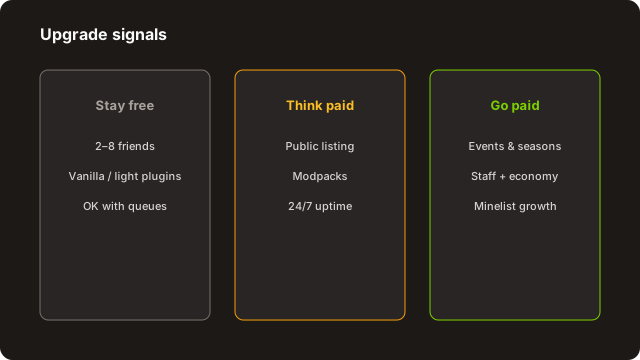
Paid hosting is not a moral failure. It is what you buy when free hosting’s failure modes are more expensive than the invoice. Concrete triggers:
- You want to list publicly and accept joins anytime—not only when an op is awake to hit Start.
- Queue waits regularly exceed the patience of new players (often a couple of minutes).
- TPS falls below playable at your true peak player count with a trimmed plugin list.
- You need automatic offsite backups, extra ports, a database, or a custom domain pointed at a stable IP.
- Staff time spent fighting the free panel exceeds the cost of a small VPS.
- You are ready to spend on player growth—paying for traffic toward a sleeping free server is burning money.
When you migrate: announce the downtime window, export worlds + plugin configs, verify the new IP with the status checker, update Minelist and Discord in the same hour, and keep the old host offline-but-backed-up for a few days in case you must roll back.
What “cheap paid” usually buys you
Entry-level game hosting is not infinite RAM either—but you typically gain always-on processes, clearer CPU shares, one-click backups, and support tickets that speak Minecraft. A small VPS gives root and responsibility. Either beats a free host that cannot stay awake when your growth experiments start working. Budget the first month as tuition: measure joins retained per day before and after the move. If retention jumps because the IP answers instantly, the upgrade paid for itself in saved goodwill.
Avoid upgrade theater
Do not buy a 12 GB plan for three friends on vanilla. Do not stay on free forever while running a public vote contest. Match spend to ambition. Re-read provider ToS for CPU abuse and backups retention so a “cheap” plan does not delete week-old saves you thought were immortal.
Security & backups on free Minecraft hosts
Accounts & panels
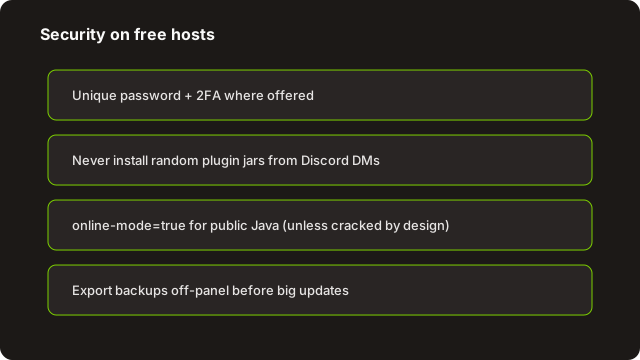
Use unique passwords and 2FA where offered (Aternos, Minehut, Oracle, Discord). Do not share owner panel logins in public tickets. Limit op to people who understand /op is root.
In-game
Whitelist for private SMPs. For public servers, invest in anti-grief (CoreProtect or equivalent), claim systems, and clear rules. Free hardware does not forgive a week of unchecked withers.
VPS / home
SSH keys only, disable password auth, restrict SSH by IP if practical, keep Java and OS patched, and never run the server as root. Close unused ports. Assume scanners hit 25565 within hours of going public.
Backups
Panel backups are necessary but not sufficient—download periodic archives you can open without that host’s account. Test restore on a spare folder. Version the server.properties and plugin configs in a private git repo if you are comfortable doing so without committing secrets.
Logs & privacy
IPs in logs are personal data in many jurisdictions. Limit who can download logs from free panels, and follow your own privacy promises if you run a public community.
Incident basics
Have a written order of operations for grief: roll back with CoreProtect (or restore a backup), ban, announce, and preserve evidence. For VPS compromise: take the instance offline, rotate secrets, restore world from an off-box backup, and assume anything on the disk after intrusion is untrusted. Free hosting does not reduce the need for that playbook—it reduces the spare RAM you have while executing it.
Phishing deserves a mention: fake “Aternos/Minehut security” emails and Discord DMs asking for panel passwords are common. Official support will not need your password in a random DM. When in doubt, open the provider site from a bookmark—not from the email link.
After hosting: list on Minelist and get players
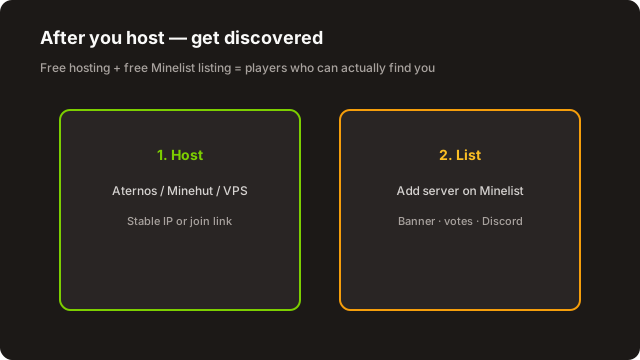
Again, clearly: Minelist is not free Minecraft hosting. We are the directory layer. Once your free or paid host has a stable address:
- Create a Minelist account (or log in).
- Add your server with the real IP/port, version, and gamemode tags that match reality.
- Upload a banner that does not look like a 2014 meme collage. Write a description that says what happens in the first five minutes.
- Verify reachability with the server status checker.
- Follow how to get more players for votes, Discord, events, and optional Pro/Sponsored—only after onboarding works.
Next step
Put your IP where players already search
Free listing on minelist.io. Host elsewhere—get discovered here.
If your free host sleeps, say so in the description (“whitelist SMP—ask Discord to wake”) rather than ghosting random joiners. Honesty converts better than a fake “24/7” claim.
Free Minecraft hosting checklist
Choose the right free path
Match skill and uptime needs before you create accounts.
- Decide: managed free (Aternos/Minehut/Server.pro), Oracle DIY, home PC, or paid trial for tests only
- Write down must-haves: always-on, plugins, mods, Bedrock, player count
- Reject “unlimited free RAM” sites that smell wrong
- Read current provider limits on their official site (not a year-old blog)
Launch the world safely
Get online without painting a target on yourself.
- Install sensible software (Paper for plugins; correct loader for mods)
- Set whitelist or protection plugins before public IP sharing
- Open only required ports; lock down SSH on VPS
- Create and download a backup you can restore offline
- Test joins from outside your network; use the status checker
Operate without surprises
Free tiers fail socially when expectations are unclear.
- Document who starts the server and how long queues take
- Trim plugins/view-distance until TPS is stable at peak
- Schedule backup exports weekly (or denser before big events)
- Decide upgrade triggers in advance (sleep killing joins, etc.)
Discoverability on Minelist
Hosting is useless if nobody can find an honest listing.
- Add server on Minelist with correct Java/Bedrock details
- Banner + description that match the live experience
- Link Discord wake instructions if the host sleeps
- Use the growth guide once retention works
Tip: Paste this checklist into your staff channel. Revisit when you change hosts or open the server to the public.